
Expired Passwords: Annual Password Reset
To help better ensure data and information security, the Transferology Lab® requires that users reset passwords once every 365 days. This article provides instructions for resetting a password in the Transferology Lab that is about to expire or has expired.
In this article:
If the user has a Transferology® Lab account, resetting the Transferology® Lab account password will also change the Transferology password.
Annual Password Reset
Upon log in, the user will be taken to the Reset Transferology Lab and TES Password screen.
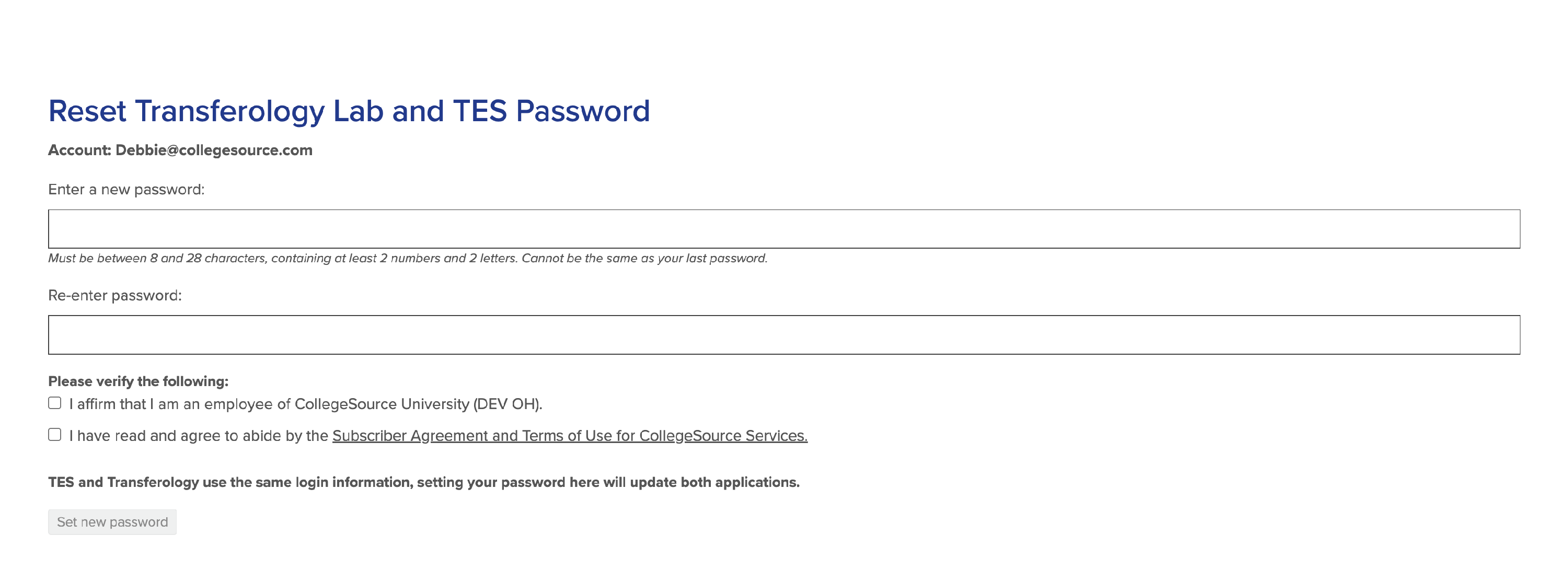
To reset the password:
- Review the password guidelines:
- The password must be new, not the same as your previous password.
- The password must be a minimum of eight (8) characters.
- The password must contain at least two letter characters and two number characters.
- The password must contain at least one uppercase character and at least one lowercase character.
- The password may contain special characters except for spaces, forward slashes, semi-colons, or sequential hyphens.
- Enter a new password into the field noted.
- Re-enter the password in the Re-enter password box.
Transferology Lab will support the copying and pasting of passwords and entering of passwords via a password management system.
The password will be hidden by default.
- To display it, select the Show button.
- To hide the password again, select Hide.
- Users will be presented with the following items to verify:
- The individual is an employee of the noted institution.
- The user has read and agreed to abide by the Subscriber Agreement and Terms of Use for CollegeSource Services.
- Review the agreement & terms of use.
- Mark the checkboxes to the left of each item.
- TES users will see a message indicating that this password reset applies to both the user's TES and Transferology Lab accounts.
- Select Submit.
The user will be directed to their Transferology Lab homepage.
Users can additionally reset the Transferology Lab account password within Update My Profile and Password anytime. Each time a password is reset, the 365 days from which the password expires starts again.