
Sophia Learning: Display Equivalencies in Transferology
Institutions may choose to grant students academic credit for Sophia Learning courses. This document provides best practices that institutions can use to display equivalencies in Transferology®.
In this article:
Getting Equivalencies into Transferology
Institutions new to Transferology have multiple options for uploading existing transfer equivalencies. See Getting Equivalencies into Transferology for more information (see Related Articles).
When importing Sophia Learning equivalencies via a flat file, use the following format:
| SendInstitutionCode | 99999950 |
| SendInstitutionName | Sophia Learning |
| SendInstitutionCity | Minneapolis |
| SendInstitutionState | MN |
| SendInstitutionCountry | United States |
|
SendCourseCode1 SendCourseCode2 etc. |
Example: ARTHIST1001 Input the course code as shown in TES. |
|
|
|
TES Data Sets
Institutions that source equivalencies through TES create these equivalencies from Sophia Learning data sets. The first Sophia Learning data set is from 2024.
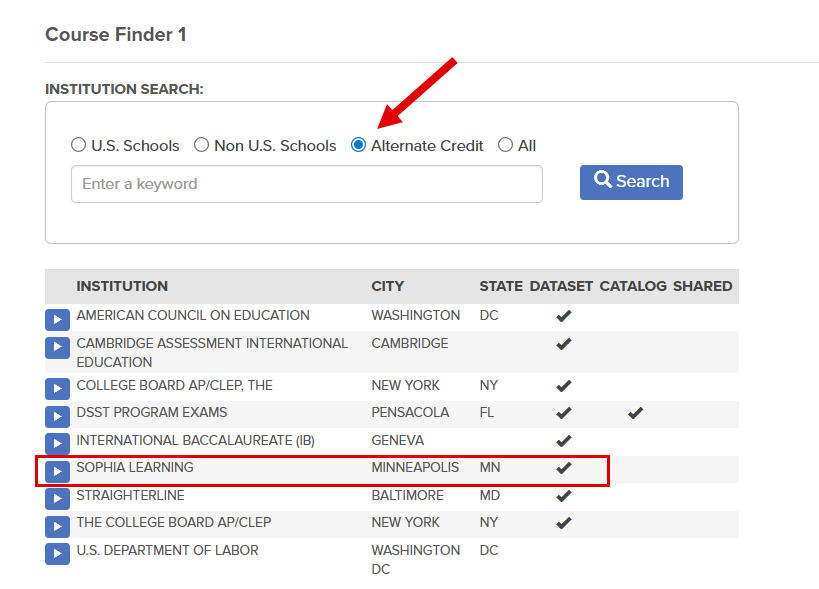
Sophia Learning provides learning experiences that can result in the award of alternate credit. When searching for the institution via the TES Course Finder, toggle Alternate Credit to see a list of these providers. Or, select All before the search.
uAchieve Tables
When creating the institutional Reference (IREF) Table and Transfer Articulation (TA) Tables for Sophia Learning, use the following:
| Field | Input |
| Source ID | 99999950 |
| Name | Sophia Learning |
|
|
|
See the Transfer Articulation Best Practices Guide for a more thorough explanation of the recommended best practice for transfer articulation. A CollegeSource Account is required.
Use the following structure when creating rules:
|
Segment Example: ARTHIST (Use the Department from TES® or the Transferology® Lab) |
|
Source Example: ARTHIST1001 (Use the Course Code from TES® or Course from the Transferology® Lab) |
|
Title Example: ART HISTORY I (Use the Course Title from TES® or the Title from the Transferology®Lab) |
|
|